Fullscreen is a free one-column photography and multimedia theme for Wordpress that can be used for portfolios, photoblogs, videoblogs, and virtually anything else where you want your content to be front and center. It provides visual artists (photographers, painters, videographers, motionographers, illustrators) a better way of presenting their latest work online using a minimalist side-scrolling homepage. Emphasis is placed on your content, rather than on an overly designed theme. If you are a free or paying subscriber to Graph Paper Press, Fullscreen can be downloaded from your member page.
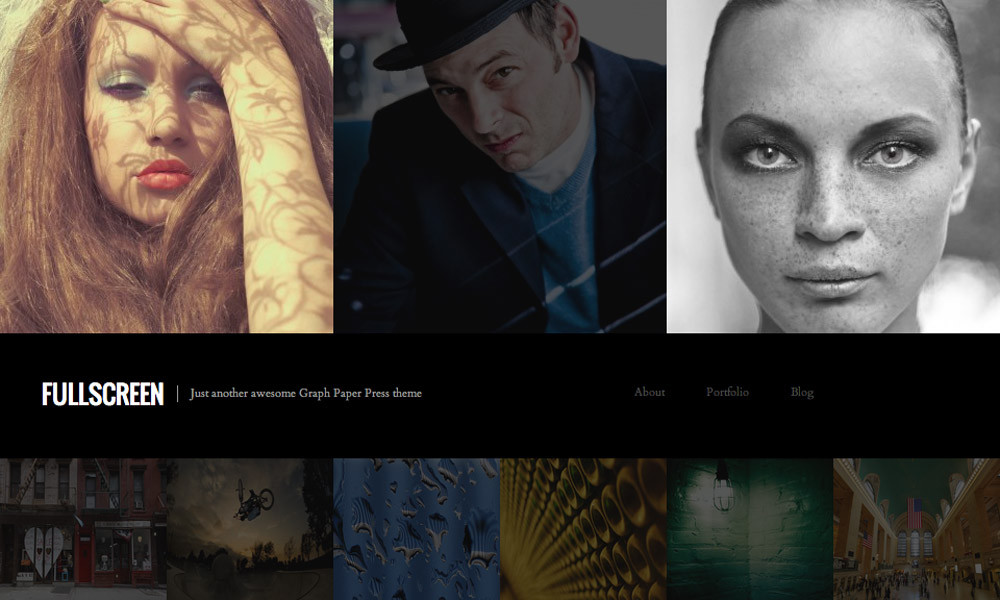
We think your site should highlight your content, not our design. Our design takes a back seat so that your content can shine through front and center. The homepage of Fullscreen is an amalgam of your latest visual content, organized in a hierarchical manner with your latest five posts featured twice as large as the preceding 20 posts. Single post pages are 950 pixels wide, enabling your post large photos, videos, or other work that is important to you. Three widgetized areas give you customization control over the bottom (footer) region of your site.
[...] clipped from graphpaperpress.com [...]
[...] Get it here. [...]
[...] Full screen is another theme which you would expect to be available at a premium, but it is free when you sign up for (free) membership with Graphpaper themes. The homepage features an array of your images with a nice rollover effect. When you click on a thumbnail, a photograph fills one column. It also possible to use theme with a combination of photographs with room for a large body of text on the right hand side. Some photographers may find the homepage a little too fussy and prefer to use a simpler layout, but it’s hard not to admire the functionality on this theme. Four columns for widgets sit at the bottom of the page. [...]
[...] Full screen is another theme which you would expect to be available at a premium, but it is free when you sign up for (free) membership with Graphpaper themes. The homepage features an array of your images with a nice rollover effect. When you click on a thumbnail, a photograph fills one column. It’s also possible to use theme with a combination of photographs with room for a large body of text on the right hand side. Some photographers may find the homepage a little too fussy and prefer to use a simpler layout, but it’s hard not to admire the functionality on this theme. Four columns for widgets sit at the bottom of the page. [...]
[...] steht das Bild im Vordergrund. Vorschau | Download (Registration erforderlich; gratis) | Homepage (Hinweise, CSS-Anpassungen usw.) Keine [...]
[...] Fullscreen [...]
[...] Demo | Theme Info [...]
[...] Demo | Theme Info [...]
[...] Fullscreen Demo • Download [...]
[...] 官方下载页面 | WOPUS下载 [...]
Fullscreen…
Fullscreen is a free one-column photography and multimedia theme for Wordpress that can be used for portfolios, photoblogs, videoblogs, and virtually anything else where you want your content to be front and center. It provides visual artists (photogra…
[...] Demo | Theme Info [...]
[...] Demo | Theme Info [...]
[...] Demo – Télécharger [...]
[...] Fullscreen Photo and Multimedia Wordpress theme | Graph Paper Press — Gorgeous free theme that would make a great portfolio. [...]
[...] 13. Fullscreen [...]
[...] 13. Fullscreen [...]
[...] 13. FULLSCREEN [...]
[...] Fullscreen [...]
[...] 13. Fullscreen [...]
[...] Fullscreen [...]
[...] Fullscreen [...]
[...] Fullscreen [...]
[...] Fullscreen [...]
[...] Fullscreen [...]
[...] Demo Source [...]
[...] Live Demo | Release Page [...]
[...] 13. Fullscreen [...]
[...] 51. Fullscreen Free Wordpress Theme [...]
[...] 51. Fullscreen Free Wordpress Theme [...]
[...] Source (you have to signup to download) [...]
[...] by Graphpaperpress: Theme Details | Theme [...]
[...] Fullscreen [...]
[...] 51. Fullscreen Free Wordpress Theme [...]
[...] Fullscreen [...]
[...] Demo | Get it [...]
[...] by Graphpaperpress: Theme Details | Theme [...]
[...] 他的Fullscreen主题我很喜欢 [...]
[...] 51. Fullscreen Free Wordpress Theme [...]
[...] Demo | Theme Info [...]
[...] Fullscreen is a free one-column photography and multimedia theme for Wordpress that can be used for portfolios, photoblogs, videoblogs, and virtually anything e …continue [...]
[...] 34. Fullscreen Free Wordpress Theme [...]
[...] Fullscreen [...]
[...] Demo | Theme Info [...]
I can get the top 5 icons at the top of the page to work, but for the life of me I can’t (and don’t know how) to get the thumbnails at the bottom to show up. Can anyone help me with this?
Does anyone know how to make the bottom icons show. I see someone asked, but I’m not sure if it was answered. It would really help me out. Thanks.
Hi, been using this theme, its great. Has anyone been able to reduce the ‘dimness’ of each window (with photo behind). I like how the images brighten when you roll over them, but is there a way to reduce the dimness that they have before you roll over them. They seem (to my eye) to be just a little too dim.
thanks much,
Jesse
I would like to eliminate the dimness almost entirely. It just makes the home page look drab upon opening.
Yicks! Now Im receiving this error if I try to open my page or open the admin. page. Any ideas how to fix this? I didn’t touch or do anything to the page.
Internal Server Error
The server encountered an internal error or misconfiguration and was unable to complete your request.
Please contact the server administrator, webmaster@lindsaymasseyarchitect.com and inform them of the time the error occurred, and anything you might have done that may have caused the error.
More information about this error may be available in the server error log.
Additionally, a 404 Not Found error was encountered while trying to use an ErrorDocument to handle the request.
I’m having three really major problems trying to get this theme to work.
The first is that the resizing application seriously changes the color of my images. The only ones that don’t shift color are ones I upload at the exactly correct resolution. Do I have to resize the images myself in order to avoid this problem?
Despite having ensured that I’m running PHP5 and that the chmod is correctly set as 777 for the cache folder, the five top thumbnails DO NOT appear automatically on the top area of home page. I MUST set them manually. I haven’t created enough posts yet to see if the small thumbnails appear in the lower area.
The third is that no matter what I do, I can’t get the theme to recognize the cropped version of a thumbnail (when I try to use the “set thumbnail” option). It persists in using the full image and arbitrarily cropping to the center. The ‘uploads’ directory clearly shows the cropped thumbnail version is present.
Hi,
I would like to ranomize the thumbmails appearing in the first page.
Do you think it is possible.
I need some help,
thanks,
Julien
I have a problem with the drop-down navigation menu when I use Internet Explorer, basically the drop- down menu just stays down.
Firefox is fine, safari is fine, Opera is fine. I don’t have any idea of what can be causing this pr. oblem but makes me think is something related with the theme. Is there any way to fix this? I really like this theme but I know that a lot of people use IE when browsing internet.
HELP!!!!!
El problema con las imagenes se sebe que en algunos servidores como Hostgator no procesa bien las intrucciones de una Libreria TimThumb, ustedes deben solicitar via ticket que les habiliten los permisos necesarios para que funcione correctamente. Así lo hice yo y el tema funciona perfectamente, Gracias.
Y no se frustren, si alguno consiguió la solución, los demás también pueden solo es cuestión de buscar un poquito mas.
Figured out the image thing. Now I cannot figure out where to change the contact info. Any help.